Modern vehicles are no longer controlled by a single electronic unit. Today’s cars contain dozens of interconnected ECUs responsible for engine management, infotainment, ADAS features, body electronics, battery management, braking systems and much more. As automotive systems became increasingly software-driven, vehicle diagnostics also evolved into a highly specialized engineering domain. One of the most important technologies supporting automotive diagnostics and ECU testing today is Vehicle Diagnostics in CAPL. Check these house-hold items on Amazon. Also, check these house-hold items on Amazon #2
CAPL (Communication Access Programming Language), is a scripting language developed by Vector Informatik for use within tools such as CANoe and CANalyzer. CAPL enables automotive engineers and testers to automate communication, diagnostics, simulations and test cases across automotive networks like CAN, LIN, FlexRay, Ethernet and DoIP.
Vehicle diagnostics in CAPL has become an essential skill in automotive validation, ECU testing, HIL testing and vehicle network development. Automotive OEMs and suppliers including companies such as Bosch, Continental AG, ZF Friedrichshafen and Volkswagen rely heavily on automated diagnostics during ECU integration and software validation.
Table of Contents
What is CAPL in Automotive Diagnostics?
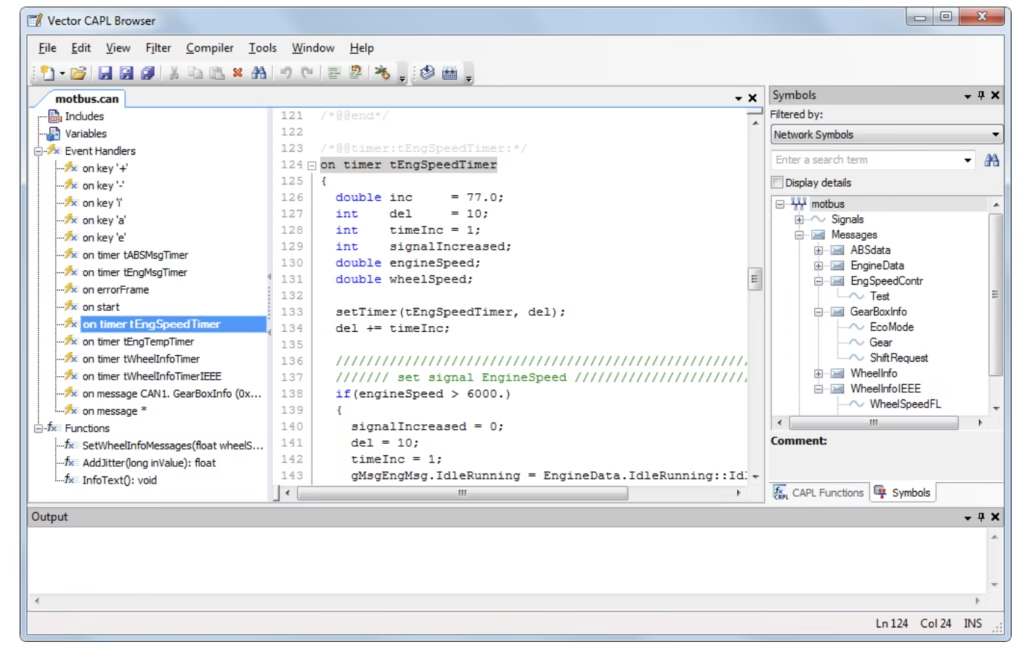
CAPL is an event-driven scripting language designed specifically for automotive communication systems. It resembles the syntax of the C programming language but is optimized for vehicle network simulation and diagnostics. Engineers use CAPL to create diagnostic requests, validate ECU responses, automate test scenarios, simulate missing ECUs, inject faults and analyze vehicle communication behavior.
Vehicle diagnostics in CAPL works closely with diagnostic protocols such as Unified Diagnostic Services (UDS), Keyword Protocol 2000 (KWP2000) and On-Board Diagnostics (OBD). These protocols allow a tester device to communicate with ECUs for reading Diagnostic Trouble Codes (DTCs), performing ECU coding, software flashing, session management and accessing live data.
According to Vector’s official documentation, CAPL diagnostic functionality allows users to access ECUs through diagnostic features in CANoe and CANalyzer using diagnostic objects like diagRequest and diagResponse. The same framework can also support diagnostics over CAN, LIN, FlexRay, K-Line and Diagnostics over IP (DoIP).
The importance of vehicle diagnostics has increased dramatically in modern vehicles because software complexity has exploded. Industry studies estimate that premium vehicles can contain more than 100 million lines of code, making automated diagnostics and validation absolutely necessary for ensuring safety and reliability.
How Vehicle Diagnostics in CAPL works?
Vehicle diagnostics in CAPL generally follow a request-response model. A tester node sends a diagnostic request to an ECU and the ECU responds with either positive or negative responses. CAPL scripts automate this interaction.
The process typically starts with adding a diagnostic description file such as CDD or ODX into CANoe. This diagnostic database defines supported services, DIDs, routines, sessions and ECU behavior. CAPL scripts then interact with these diagnostic services programmatically.
A simple diagnostic workflow in CAPL may involve selecting a target ECU, sending a request, waiting for a response and validating the returned data. Vehicle diagnostics in CAPL provides dedicated diagnostic objects including diagRequest and diagResponse to simplify this process.
For example, a tester may send a UDS service request for reading ECU software version information using service 0x22, also called ReadDataByIdentifier. CAPL can automatically send the request, extract the returned parameter, compare it against expected values and log the result into a test report.
This automation is extremely valuable in automotive projects because manual testing becomes impractical when hundreds of ECUs and thousands of test cases are involved.
Understanding Diagnostic Sessions in CAPL
One of the most important concepts beginners must understand is diagnostic session handling. Modern ECUs support multiple diagnostic sessions including default session, programming session and extended diagnostic session.
Certain services are available only in specific sessions. For instance, software flashing or ECU coding operations often require programming session access. CAPL scripts can automate the session switching process.
In practice, a CAPL script may first request an extended session using UDS service 0x10. Once the ECU confirms the session transition, the script can continue with advanced diagnostic operations such as reading memory data or performing routine controls.
Vector documentation also explains that CAPL supports transport layer configuration and diagnostic layer handling directly within CANoe property settings. This simplifies session control and transport protocol management for developers.
A real-world example can be seen during ECU flashing validation. Automotive engineers often use CAPL scripts to switch ECUs into programming session, initiate firmware download, monitor transfer progress and verify successful installation after reboot.
CAPL Coding Examples for Diagnostics
One of the best ways to understand diagnostics with CAPL is through practical coding examples. CAPL is heavily event-driven, meaning scripts react to messages, diagnostic responses, timers, or user actions. Vector’s official documentation provides several examples showing how diagnostic requests and responses are handled inside CANoe simulations.
A very basic CAPL diagnostic request example starts with creating a diagnostic request object and sending it to an ECU. This is commonly used in UDS diagnostics for services such as session control, reading DTCs, or requesting ECU information.
variables
{
  diagRequest Door.DefaultSession_Start req;
}

on key 'd'
{
  diagSendRequest(req);
}
In this example, pressing the keyboard key d triggers a diagnostic request. The object Door.DefaultSession_Start is typically defined inside the diagnostic description file loaded into CANoe. This kind of structure is widely used in automated ECU validation environments.
A more advanced example involves receiving and processing ECU responses. CAPL uses on diagResponse event handlers to capture diagnostic responses from ECUs.
on diagResponse Door.DefaultSession_Start
{
  write("Positive diagnostic response received");
}
This event-driven structure is one of the biggest strengths of CAPL because it allows asynchronous ECU communication handling. Automotive ECUs often require delays, transport layer handling, and session management, so event-based scripting becomes very efficient.
CAPL users often encounter issues when sending multiple diagnostic requests sequentially without waiting for ECU responses. Engineers recommend chaining requests inside diagnostic response handlers instead of sending everything simultaneously.
For example:
variables
{
  diagRequest ECU.ProgrammingSession req1;
  diagRequest ECU.SecuritySeed req2;
}

on start
{
  diagSendRequest(req1);
}

on diagResponse ECU.ProgrammingSession
{
  write("Programming session activated");
  diagSendRequest(req2);
}
This approach ensures that the second request is transmitted only after the ECU successfully responds to the first request. In real automotive projects, this sequence is commonly used during ECU flashing and security authentication procedures.
Another very important CAPL diagnostic capability is parameter extraction. Engineers frequently need to read values such as VIN numbers, software versions, serial numbers, or calibration identifiers from ECU responses.
CAPL provides functions like diagGetParameter() for this purpose.
variables
{
  diagRequest Door.Read_SoftwareVersion req;
  diagResponse resp;
  char swVersion[50];
}

on key 's'
{
  diagSendRequest(req);
}

on diagResponse Door.Read_SoftwareVersion
{
  diagGetParameter(this, "SoftwareVersion", swVersion, elcount(swVersion));

  write("Software Version: %s", swVersion);
}
This type of code is widely used in regression testing environments where hundreds of ECUs are automatically validated against expected software versions before vehicle release.
Vector’s official documentation also demonstrates how CAPL can simulate ECU responses. This is especially useful when actual ECUs are unavailable during early development stages.
on diagRequest *
{
  diagResponse this resp;
  diagSendPositiveResponse(resp);
}
This generic handler automatically sends positive responses to incoming requests. It can be used for rapid ECU prototyping or basic simulation environments.
A more detailed simulation example from Vector documentation shows how a specific service can return custom data values such as a serial number.
on diagRequest Door.Serial_Number_Read
{
  diagResponse Door.Serial_Number_Read resp;

  byte serialNumber[13] =
  {
    0xFF,0xFF,0xFF,0xFF,0xFF,
    0xFF,0xFF,0xFF,0xFF,0xFF,
    0xFF,0xFF,0xFF
  };

  long ret;

  ret = diagSetParameterRaw(
        resp,
        "Serial_Number",
        serialNumber,
        elCount(serialNumber));

  if(ret >= 0)
  {
    diagSendResponse(resp);
  }
}
This example is highly relevant for automotive simulation teams because ECU simulations are heavily used during SIL (Software-in-the-Loop) and HIL (Hardware-in-the-Loop) testing.
CAPL also supports raw diagnostic manipulation for fault injection and robustness testing. Vector documentation explains that functions such as DiagGetPrimitiveByte() and DiagGetPrimitiveData() allow engineers to directly access raw diagnostic frame data.
on diagResponse Door.*
{
  byte rawData[4095];

  if((DiagGetPrimitiveByte(this,0)==0x50)
      && (DiagGetPrimitiveByte(this,1)==0x99))
  {
    write("Undefined service response received");

    DiagGetPrimitiveData(this,
                         rawData,
                         elcount(rawData));

    write("%d Bytes received",
          DiagGetPrimitiveSize(this));
  }
}
This type of low-level manipulation is extremely useful in automotive cybersecurity and ISO 26262 functional safety testing. Engineers intentionally send invalid requests to ensure ECUs behave safely under abnormal conditions.
Another common beginner use case involves reading Diagnostic Trouble Codes (DTCs). CAPL scripts can automate DTC retrieval and validation processes.
variables
{
  diagRequest FaultMemory.ReadDTC req;
}

on key 'r'
{
  diagSendRequest(req);
}

on diagResponse FaultMemory.ReadDTC
{
  write("DTC response received");
}
In real-world automotive projects, automated DTC testing is one of the most important validation activities because fault handling directly affects vehicle reliability, safety, and serviceability.
CAPL diagnostics are also heavily used in electric vehicle testing. Battery Management Systems (BMS), charging ECUs, inverter controllers, and thermal management modules all require extensive diagnostic validation. Engineers use CAPL scripts to automate charging validation, fault monitoring, and ECU recovery scenarios.
CAPL Diagnostic Functions
CAPL contains a large collection of built-in diagnostic functions that simplify ECU communication. Functions like diagSendRequest, diagGetLastResponse and diagGetParameter are among the most widely used.
The diagGetLastResponse function allows engineers to capture the latest ECU response associated with a diagnostic request. This is useful when validating whether an ECU returned the correct positive response after a request.
Similarly, diagGetParameter helps extract parameter values from diagnostic responses. Engineers can retrieve numeric or textual values from returned ECU data and compare them with expected values for automated validation.
These functions significantly reduce manual analysis effort. Instead of manually decoding hexadecimal diagnostic responses, CAPL can automatically interpret data fields and generate readable test results.
For beginners, understanding these built-in functions is essential because they form the foundation of diagnostic automation.
Raw Diagnostics and Fault Injection
Another powerful feature of CAPL diagnostics is raw data manipulation. In some testing scenarios, engineers intentionally send malformed or undefined requests to validate ECU robustness.
Vector’s documentation explains that CAPL supports primitive-level diagnostic access using functions such as DiagSetPrimitiveData and DiagSetPrimitiveByte. These functions allow testers to directly manipulate raw bytes inside diagnostic frames.
This capability is extremely useful for fault injection testing. For example, a tester may deliberately modify a sub-function byte to an unsupported value and verify whether the ECU correctly responds with a negative response code.
Fault injection has become increasingly important in automotive cybersecurity and functional safety testing. Standards such as ISO 26262 emphasize robust ECU behavior under abnormal operating conditions. CAPL-based fault injection helps validate such behavior early during development.
A practical example would involve testing how a battery management ECU reacts to invalid diagnostic requests during high-voltage operation. CAPL scripts can repeatedly send malformed requests while monitoring ECU stability and response handling.
CAPL in Automated ECU Testing
One of the biggest advantages of CAPL diagnostics is automation. Automotive companies increasingly rely on automated testing to reduce development time and improve software quality.
CAPL enables engineers to create reusable test modules that automatically execute diagnostic sequences without human intervention. These scripts can run overnight regression tests covering hundreds of diagnostic services across multiple ECUs.
For example, an automotive supplier validating a Body Control Module may use CAPL scripts to automatically test all DTC handling behavior. The script can inject faults, trigger ECU events, read stored DTCs, clear fault memory and verify system recovery.
Community discussions among automotive engineers also highlight how CAPL is widely used for ECU behavior simulation, message manipulation and HIL testing environments. Many engineers describe CANoe as a core platform for automotive validation because of its strong diagnostic and automation capabilities.
Automated diagnostics are especially critical in electric vehicles and ADAS systems, where ECU interactions are highly complex. Modern EV platforms may contain specialized ECUs for battery management, charging systems, thermal management and inverter control. CAPL scripts help validate communication reliability across all these systems.
Diagnostics over CAN, Ethernet and DoIP
Traditionally, automotive diagnostics operated mainly over CAN networks. However, modern vehicles increasingly use Automotive Ethernet and Diagnostics over IP (DoIP) because CAN bandwidth is no longer sufficient for software-heavy systems.
CAPL supports diagnostics across multiple communication technologies including CAN, LIN, FlexRay and DoIP. According to Vector documentation, diagnostic workflows remain largely similar across these transport technologies apart from bus-specific differences.
This flexibility is extremely valuable for automotive engineers because vehicle architectures are rapidly transitioning toward zonal and Ethernet-based systems.
For example, OTA software updates in connected vehicles often rely on Ethernet-based diagnostics because firmware packages can be several gigabytes in size. CAPL helps engineers simulate and validate these high-speed diagnostic workflows.
Luxury vehicle manufacturers such as Mercedes-Benz Group and BMW increasingly deploy Ethernet-based diagnostics to support advanced software architectures.
Learning CAPL Diagnostics as a Beginner
For beginners entering automotive testing or ECU validation, CAPL diagnostics may initially seem intimidating because of the combination of networking concepts, diagnostic protocols and scripting logic. However, learning becomes much easier when approached step by step.
The best starting point is understanding CAN communication basics and UDS diagnostic services. Once these concepts are clear, beginners can start writing small CAPL scripts that send simple diagnostic requests and analyze responses.
Many engineers recommend practicing with CANoe demo environments because they allow users to simulate ECUs and vehicle networks without requiring actual hardware. Community discussions also mention that CAPL learning becomes easier through hands-on scripting exercises involving timers, message events and diagnostic services.
A practical beginner project may involve creating a CAPL script that reads vehicle VIN information from an ECU and displays the result in the CANoe write window. This simple exercise teaches diagnostic requests, response handling, parameter extraction and logging.
Check this All-in-one Printer.
Over time, beginners can expand into advanced topics such as security access handling, seed-key authentication, fault injection and automated regression testing.