
Modern vehicles rely on dozens of ECUs to control everything from braking and airbags to the engine and steering. These ECUs run complex software and software can fail: a bug, a corrupted memory value, or an unexpected event can leave an ECU stuck in a loop while it still looks like it’s running. In a car, that kind of silent failure can be dangerous.
AUTOSAR solves this with the Watchdog Driver in AUTOSAR (Wdg), a Basic Software module that controls a hardware timer designed to reset the ECU when the software stops responding.
In this beginner-friendly guide, you’ll learn what a watchdog is, where the Wdg driver sits in the AUTOSAR stack, how its counter, timeout and modes work and how the Watchdog Manager and the GPT timer decide when to refresh it, with diagrams to make each step easy to follow.
Table of Contents
Why does an ECU need a watchdog?
Imagine an airbag ECU whose software gets stuck in an endless loop. It looks “alive” from the outside, but it can no longer do its job. A watchdog is a hardware timer that catches exactly this situation. It counts upward on its own, and the software must refresh (trigger) it regularly. If the software forgets, the counter hits its limit and the watchdog resets the ECU.
Think of it as a dead-man’s switch. As long as healthy software keeps pressing the button in time, nothing happens. The moment the button is not pressed, the system restarts into a known state. The Watchdog Driver in AUTOSAR is the piece of Basic Software that talks directly to this hardware. It has three jobs:
- Initialize the hardware watchdog.
- Trigger the hardware watchdog.
- Change its mode (slow, fast or off).
Where does the Watchdog driver in AUTOSAR live?
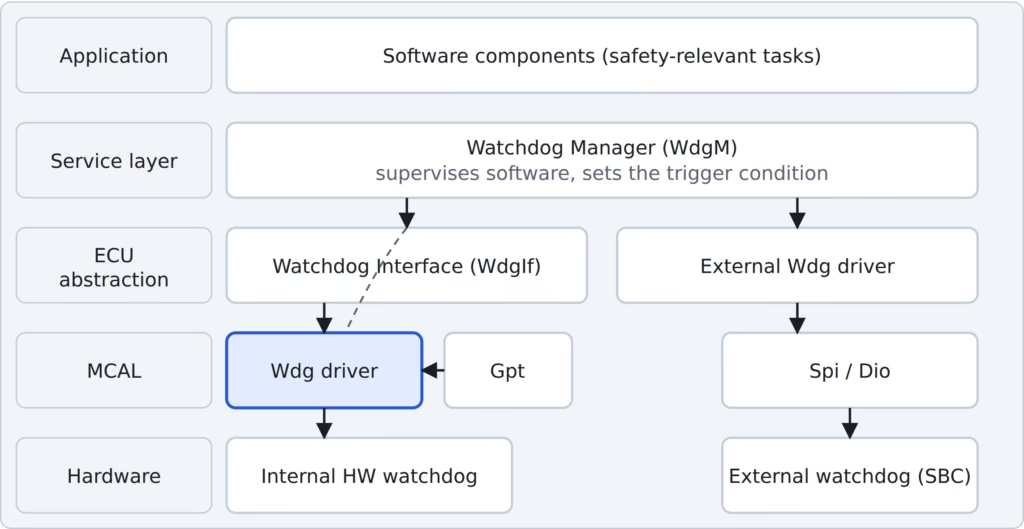
The Watchdog Driver in AUTOSAR sits in the MCAL (Microcontroller Abstraction Layer), the lowest software layer of the Classic AUTOSAR stack. Above it, the Watchdog Interface (WdgIf) hides whether the watchdog is inside the MCU or an external chip, and the Watchdog Manager (WdgM) supervises the application software and decides whether triggering is allowed.
A watchdog can be internal (built into the microcontroller) or external (a separate chip such as a System Basis Chip, SBC). An external watchdog has its driver in the ECU Abstraction layer, and it needs another MCAL driver, such as SPI or DIO, to reach the chip.
The core idea: a Counter and a Timeout
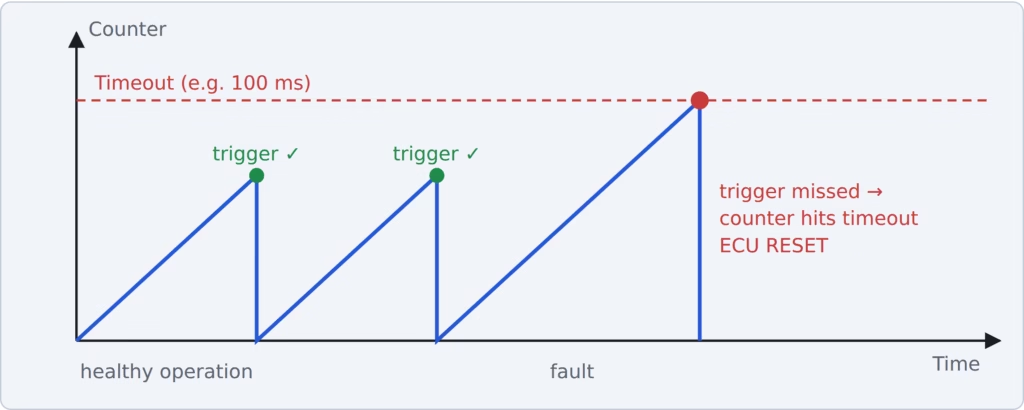
When Wdg_Init() runs, the hardware watchdog’s counter starts at 0 and counts up with its clock. Each time the software triggers the watchdog, the counter returns to 0. If the counter reaches the configured timeout, the watchdog resets the ECU.
Here is an example. Watchdog clock = 1 kHz, so 1 tick = 1 ms. Timeout = 100 ms. The counter counts 0, 1, 2 … 100. If no trigger arrives before it reaches 100, the ECU resets.
Slow mode, fast mode and OFF mode
The Wdg driver can run the hardware watchdog with different timeouts. The mode is chosen at configuration time, and can be changed at run time with Wdg_SetMode(), which the Watchdog Manager calls according to its configuration.
A common pattern is to start in slow mode, so a long start-up routine doesn’t cause a false reset, and then switch to fast mode once the system is running normally so faults are caught quickly.
How is the watchdog triggered at the right time?
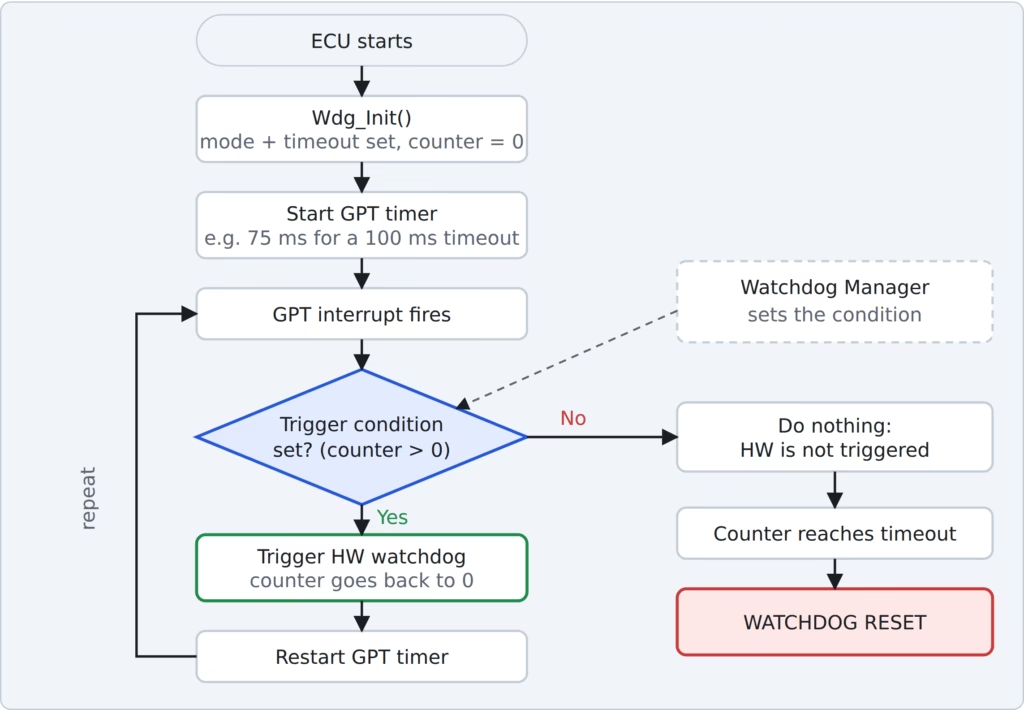
AUTOSAR recommends using the GPT (General Purpose Timer) driver. You configure a GPT timer for the interval at which you want to trigger the watchdog, and the GPT interrupt does the triggering.
Here is an Example. Timeout = 100 ms and you want to trigger every 75 ms. Configure the GPT for 75 ms. Right after the watchdog is triggered (counter back to 0), start the GPT timer immediately so both clocks stay aligned.
There is one more gate: the trigger condition. The Watchdog Manager sets it, based on whether the supervised software is behaving. When the GPT interrupt fires, the driver checks it:
- Condition set (trigger counter > 0): the driver triggers the hardware watchdog.
- Condition not set (0): the driver deliberately does not trigger, the counter overflows, and the watchdog resets the ECU.
The Watchdog Manager passes the condition down through the Watchdog Interface to Wdg_SetTriggerCondition(). For an external watchdog, the trigger itself is sent over SPI or DIO.
Key functions to remember
| Function | What it does |
| Wdg_Init() | Initializes the hardware watchdog with the configured mode and timeout |
| Wdg_SetMode() | Switches between slow, fast and off mode |
| Wdg_SetTriggerCondition() | Receives the trigger counter from the Watchdog Manager (0 = stop triggering) |
Important configuration parameters
- Watchdog clock reference: the clock that drives the watchdog counter.
- Initial / default mode: slow, fast or off at start-up.
- Slow mode timeout and fast mode timeout: the timeout used in each mode.
- Initial timeout: the timeout applied right after initialization.
- WdgDisableAllowed: whether OFF mode may be used at all.
- External watchdog reference: a DIO channel group if it is wired through DIO pins, or a SPI sequence if it is accessed over SPI. For an SBC, also set its watchdog options as described in the chip’s data sheet.
A common question: how often should I trigger?
People often ask what ratio of trigger interval to timeout to use. AUTOSAR does not mandate one. In practice, engineers trigger well before the timeout (often somewhere around half to three-quarters of it) so that normal timer jitter and interrupt latency never cause a false reset.
Some watchdog chips also define a window, a minimum time before which triggering is too early, so always check the hardware data sheet.
Quick recap
- The Wdg driver (MCAL) initializes, triggers and configures the hardware watchdog.
- If software does not trigger in time, the counter hits the timeout and the ECU resets.
- Slow mode suits start-up, fast mode suits run time, OFF is allowed only if configured.
- A GPT timer interrupt performs the trigger, but only when the Watchdog Manager has set the trigger condition.
- External watchdogs are triggered through SPI or DIO.

